Neighborbrite Landscape Design
- 4.6
- Rating
- 10.00K
- Installs
- Free
- Price

 Analysis by App-foxy
I approached Neighborbrite Landscape Design as someone trying to turn a vague outdoor idea into something I could actually discuss with a partner, gardener, or contractor. The app sits in the House & Home category and comes from Neighborbrite Inc., with a clear focus on using AI to rethink gardens, yards, and other outdoor spaces. That focus matters because many people do not need a full architectural plan at the beginning; they need help seeing what might work before spending money or moving soil.
My first impression was that this is best understood as a visual planning companion rather than a replacement for a landscape professional. It helps bridge the awkward gap between “this area looks tired” and “here is the kind of outdoor space I want.” The free entry point makes it easy to experiment, while the presence of optional purchases means I would still approach the app as a trial-and-idea tool rather than assuming every useful outcome is included without further cost.
From an uninspiring yard to a workable design conversation
The most realistic starting condition is not an empty plot. It is usually a real photo of a space with awkward corners, existing plants, a fence, paving, a shed, or a patch of lawn that never looks quite right. That is where an AI landscape app has a useful job: it can help me explore directions quickly when I do not yet have the vocabulary to describe them.
You May Also Like

 Blood Strike: 2.5 Anniversary
Blood Strike’s Loadouts Turn Every Drop Into a Tactical Gamble
A close look at Blood Strike’s custom loadouts: how fast access to signature weapons reshapes its battle royale rhythm, rewards preparation, and narrows the gap between fights.

 Pandora - Music & Podcasts
Pandora’s Music Is Easy to Start, but Harder to Recover
Pandora’s strength is its low-effort path from a seed to a station. Its weak spot is how much confidence it asks you to place in connection, setup, and quiet recovery.

 8 Ball Pool
 Is Built on Rivalries, Rematches, and Routine
A close look at the rivalries, rematches, shared routines, and unanswered safety questions that turn a quick pool match into a persistent mobile community.

 Samsung Music
’s Quiet Strength Is Playing What You Already Own
Its reach comes less from spectacle than from dependable access to a personal library. That simplicity is both the app’s strongest retention engine and its ceiling.

 AccuWeather: Weather Radar
AccuWeather Review: A Quick, Clear Forecast for Everyday Decisions
For everyday plans, the best forecast is the one you can understand quickly. AccuWeather makes rain timing, radar, and local conditions easy to act on, with a few trade-offs.

 Hill Climb Racing
Why Hill Climb Racing Still Turns Crashes Into One More Run
A tiny car, a bumpy hill and one more upgrade: Hill Climb Racing keeps resurfacing because its simple chaos makes every near-miss feel personal.
More From Our News Desk
View All News


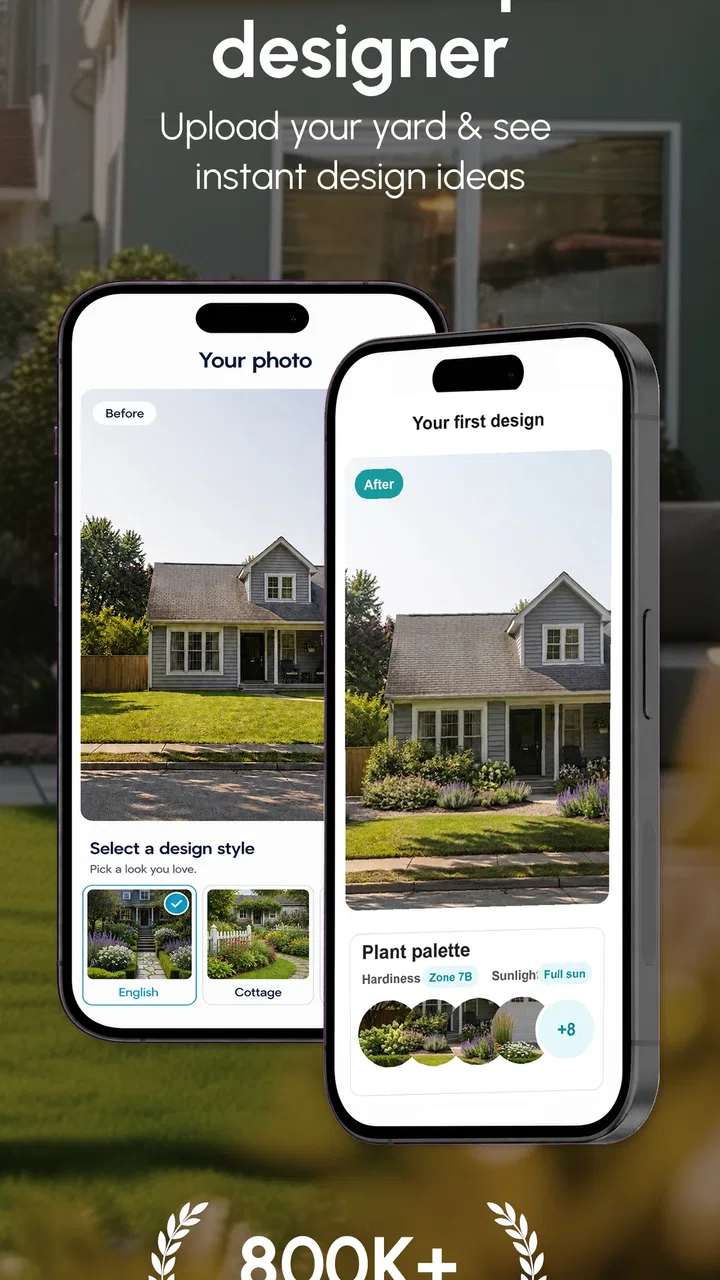
I would begin with one clearly framed view instead of trying to capture the whole property in a single image. A front garden, patio edge, narrow side passage, or back-yard seating area each creates a more manageable design question. The narrower the question, the easier it is to judge whether the visual result is moving toward something practical or merely attractive.
For example, imagine a small paved back area that currently holds two chairs, a few pots, and a neglected strip beside the wall. My actual goal might be a softer, more private place for morning coffee. I would not ask the app to solve the entire garden at once. I would use the existing view as the starting point, then compare ideas that change the mood of the space without losing the parts that already work.
This is an important distinction from browsing ordinary garden inspiration. A general image search can show beautiful courtyards, but those pictures rarely respect the proportions, sightlines, and fixed elements of my own yard. A visual redesign based on my space gives me a more personal reference point, even when I still need to question whether the proposed changes are realistic.
Preparing the input before asking for ideas
Good results begin with a useful image. I would take the photo in daylight, keep the camera level, and avoid hiding the problem behind furniture or a very tight crop. If the app is asked to redesign a dark, cluttered, or partially obscured view, I would treat the output as a broad mood suggestion rather than a dependable representation of the property.
I also find it helpful to decide what must remain before generating anything. A mature tree, a drainage route, a gate, a retaining wall, or a favorite planter may be non-negotiable. Keeping those constraints in mind prevents the attractive version from becoming a fantasy that ignores the reason the space is difficult in the first place.
That preparation is one of the less obvious skills needed with an AI design tool. The app can offer visual direction, but it cannot make a poor brief precise. A quick photo and a clear human objective are more valuable than repeatedly requesting random styles. I would save the original image as a reference and compare each new concept against it, rather than judging every result in isolation.
Moving through the design flow
Once the space is represented, the useful part of the process is comparison. I would look for changes in layout, planting character, materials, and atmosphere, not just whether the image looks polished. A concept that adds structure to a bare boundary may be more useful than one that simply adds more flowers. Likewise, a calmer arrangement with fewer elements may suit a small yard better than an elaborate makeover.
My recommended workflow is deliberately slow: review the first concept, identify one thing that feels right, identify one thing that feels wrong, and use those observations to guide the next attempt. This avoids a common trap in AI visual tools, where endless variations become entertainment rather than planning. The goal is not to collect attractive pictures. It is to narrow the decision.
For the imaginary patio, I might compare a leafy privacy treatment with a cleaner arrangement of containers and low planting. The first could create the desired sense of enclosure, but it might also demand regular trimming. The second could be easier to rearrange and maintain, though it may provide less screening. The value of the app is that it helps me see this trade-off before buying anything.
I would also use the images to separate style decisions from technical decisions. The app can help me decide whether I prefer a relaxed, planted look or a more ordered one. It should not be the only basis for deciding whether a plant suits the local climate, whether a wall can support a feature, or whether a surface will drain properly. That separation keeps the creative stage useful without confusing it with construction advice.
Turning a visual idea into a handoff
The strongest outcome is not necessarily the image itself. It is the conversation that follows. I could show a preferred concept to a household member and ask a focused question: do we want more privacy, more seating, easier maintenance, or a stronger connection to the house? This is much clearer than saying that the garden feels unfinished.
A gardener or landscape contractor could also use the image as a starting reference, but I would explain that it is a concept, not a measured specification. The handoff should include the original photo, the chosen visual direction, and a short list of fixed requirements. I would mention access, sunlight, storage, pets, children, and maintenance expectations in plain language. Those details often matter more than the decorative style shown in the picture.
This is where the app compares favorably with a notebook full of disconnected ideas. A sketch can be more accurate, but it takes time and confidence to produce. A catalog can provide plant knowledge, but it may not help me imagine the whole space. Neighborbrite Landscape Design occupies the middle ground: fast enough for exploration and personal enough to make a discussion concrete.
There is also a useful handoff between members of the same household. One person may care about appearance while another cares about mowing, watering, or keeping a clear route to the bins. Looking at a shared visual proposal can reveal disagreements early. In my view, that is a practical benefit that is easy to overlook: the app can reduce abstract arguments by giving everyone the same picture to react to.
What the finished result can and cannot tell me
The finished result works best as a direction for the space. It can help me decide whether I am drawn to a more planted boundary, a social seating area, a simpler low-maintenance arrangement, or a stronger visual connection between indoor and outdoor areas. That is already valuable because early uncertainty is often the most expensive stage to leave unresolved.
I would be careful with details that appear exact. An AI image may make a tree, planter, pathway, or seating arrangement look properly placed even when the proportions are only approximate. I would not use the picture to estimate quantities, verify clearances, identify species, or approve structural work. For those decisions, a local professional and the actual conditions on site remain more reliable.
Another practical tip is to judge the concept at different times of day in real life, even if the visual result looks convincing. A sunny image can make a design feel open and welcoming, while the same corner may be shaded, windy, or overlooked for much of the day. The app can start the conversation about atmosphere, but I still need to observe how the space behaves.
The result is also more useful when I ask whether I can maintain it. A lush design may be appealing to someone who enjoys gardening every weekend but unsuitable for a person who wants occasional upkeep. I would treat maintenance as part of the design brief from the beginning. Otherwise, the most beautiful concept may become the next version of the problem I was trying to solve.
Where the workflow becomes less comfortable
The first point of friction is the gap between visual possibility and physical reality. Oddly shaped plots, steep levels, poor soil, existing roots, drainage issues, and strict property boundaries can all change what is feasible. The app may still help with mood and arrangement, but the further the project moves toward construction, the less I would rely on an unmeasured visual proposal.
A second limitation is the temptation to keep generating instead of deciding. AI makes variation easy, and that can encourage a cycle of chasing a perfect image. I would set a small shortlist and write down why each option survives. If a concept cannot be explained in terms of use, maintenance, and constraints, it probably has not earned a place in the plan.
The cost model is another consideration. The app is free to install and use as an entry point, but optional in-app items range from around twenty-five dollars to around one hundred fifty dollars each. I would therefore explore the basic experience first and only consider paying after deciding what specific planning problem the purchase would solve. Anyone expecting a completely unlimited design service at no cost should check the purchase prompts carefully before committing.
Device compatibility is worth checking as well. The app supports Android devices running version 7.0 or later, which covers a wide range of phones but does not guarantee the same experience on every older handset. On a less capable device, image-based work may feel less comfortable than on a newer phone with a larger screen. I would prefer reviewing concepts on a tablet or larger display when making a detailed household decision, if that option is available to me.
Who will get the most from it
I think this app is a strong match for renters who want reversible ideas, homeowners at the brainstorming stage, and anyone who struggles to translate a feeling into a design brief. It is especially helpful when the main question is “which direction suits this space?” rather than “what exact materials and quantities should I order?” People planning a modest refresh can use it to compare priorities before visiting a garden center.
It can also help someone preparing for a professional consultation. Arriving with a few visual references based on the actual yard may make the first meeting more productive. Instead of asking a designer to guess what “natural but tidy” means, I can point to the parts of a concept that capture the feeling I want and the parts that do not.
I would be more cautious if I needed technical documentation, a planting schedule, accurate site measurements, or confidence about local regulations. A specialist landscape design service, a qualified contractor, or a knowledgeable local nursery would be better for those needs. The same applies to projects involving retaining structures, electrical work, irrigation, major drainage, or mature trees. A visual AI app should not be treated as approval for work that carries safety or legal consequences.
People who dislike experimenting with images may also find the process less useful. The app rewards comparison and interpretation. If I want a fixed shopping list immediately, it is probably not the right first tool. Its strength is helping me think, not removing every decision.
How it compares with familiar alternatives
Compared with a standard inspiration board, Neighborbrite Landscape Design has the advantage of placing ideas in the context of my own outdoor space. A board is excellent for collecting textures, colors, and planting moods, but it can hide the difference between a beautiful reference and a workable layout. This app makes the discussion more grounded, even if the result still needs professional checking.
Compared with drawing by hand, it is faster for people who are not comfortable with perspective or scale. Hand sketches remain valuable because they force me to think about boundaries and movement, but they require more effort. I would use a sketch after choosing a direction, not necessarily before. The app helps me get past the blank page; a measured drawing can then add discipline.
Compared with full professional software, the app is more approachable but less suitable for technical planning. Specialist tools may handle dimensions, layers, plant libraries, lighting, and construction details more rigorously. They also demand more time and knowledge. For a homeowner deciding between two broad approaches, that extra complexity may be unnecessary. For a contractor preparing a precise build, it is likely essential.
The best combined workflow is therefore simple: use the app to explore and communicate, use real measurements and site observation to test the idea, then involve a professional when the project becomes structural or expensive. That division of labor gives the app a clear role without asking it to do a job it was not designed to do.
My practical verdict after following the whole workflow
Neighborbrite Landscape Design succeeds when I treat it as a fast visual thinking tool. Starting with a real photo, defining one problem, comparing a few directions, and handing the preferred concept to another person creates a sensible path from uncertainty to action. The app’s AI approach makes that first step less intimidating than beginning with a blank sketch or a long list of plants.
Its limitations are just as important. The images should guide discussion, not replace measurements, horticultural knowledge, or construction judgment. The optional purchases make it sensible to test the experience before spending, and the workflow can become distracting if I generate endlessly without recording decisions. Those are manageable issues, provided I keep the purpose clear.
The app has a 4.6 average from around two hundred ratings, with over ten thousand installs, and it is rated for Everyone. I read those figures as signs of a small but positive user base rather than a reason to assume it will solve every kind of landscape project. Its current version is 2.4.1, and the free starting price makes experimentation relatively easy.
My recommendation is to use it before shopping, not instead of planning. If I were helping a friend with a tired patio or confusing garden boundary, I would suggest taking a clean photo, choosing one practical goal, and using the resulting concepts to start a better conversation. For inspiration tied to a real place, it is genuinely useful. For exact plans, technical confidence, or a complete professional handoff, I would move beyond the app before making a serious commitment.
FAQs for Neighborbrite Landscape Design
01What is Neighborbrite Landscape Design, and what can I use it for?
Neighborbrite Landscape Design is a mobile landscaping visualization tool that helps you explore ideas for improving an outdoor space. You can use it to experiment with garden layouts, planting styles, outdoor furniture, pathways, lighting, and other design elements. It is especially useful for collecting inspiration and creating a clearer concept before speaking with a landscaper or starting a renovation.
02How does Neighborbrite create a landscape design from my property?
The app generally works by using a photo of your yard or outdoor area as the starting point. After uploading or taking an image, you can select a preferred design style or describe the type of transformation you want to see. The app then generates a visual concept based on that image. Results can vary depending on the photo quality, camera angle, visible space, and how clearly the requested design is described.
03Is Neighborbrite Landscape Design suitable for planning a real garden or renovation?
Neighborbrite can be helpful during the early planning stage, but its designs should be treated as visual inspiration rather than exact construction plans. Generated images may not accurately represent measurements, sunlight conditions, drainage, local climate, plant availability, building regulations, or maintenance requirements. Before purchasing materials or planting, confirm the design with a qualified landscaper or gardening professional.
04Does Neighborbrite Landscape Design require payment or offer in-app purchases?
The availability of features may depend on the current version of the app, region, and subscription or credit system offered by the developer. Some tools or design generations may be available for free, while additional creations, advanced options, or increased usage could require payment. Check the app’s official store listing and review the pricing, renewal terms, and cancellation policy before subscribing.
05What should I know about privacy when uploading photos to Neighborbrite?
Because the app may process photographs of your home, garden, or surrounding property, it is important to review its privacy policy before uploading images. Avoid including people, house numbers, documents, or other sensitive information in photos whenever possible. Check how images are stored, whether they are used to improve the service, and whether you can request deletion of your data.
Pros
- Visualize landscape ideas before making costly changes.
- Useful inspiration for gardens
- patios
- lighting
- and outdoor features.
- Helps organize design ideas in one convenient place.
- Can make outdoor planning more approachable for beginners.
- Supports comparing different styles for your property.
Cons
- Suggested designs may not reflect your exact yard conditions.
- Some features or content may require an account or subscription.
- Generated ideas may overlook drainage
- zoning
- or local regulations.
- Results can depend heavily on the quality of uploaded photos.
- Professional landscaping advice may still be needed for complex projects.

Neighborbrite Landscape Design
Gallery